
If your team spends eight or more hours a day at a desk, the chair they sit in is one of the most important investments you can make. Poor seating leads to back pain, reduced concentration, and increased absenteeism, all of which cost your business far more than a quality chair ever would. For NYC businesses navigating everything from open-plan trading floors to executive suites, choosing the right ergonomic office chair requires more than picking the most expensive option in a catalog.
This guide covers everything you need to know about ergonomic office chairs in NYC, what to look for, which models lead the market, how to match seating to your workspace, and what you should expect to spend. As a certified MillerKnoll dealer serving New York City since 2002, we've specified and installed thousands of chairs across some of the city's most demanding offices.
Why Ergonomic Seating Matters More in NYC Offices
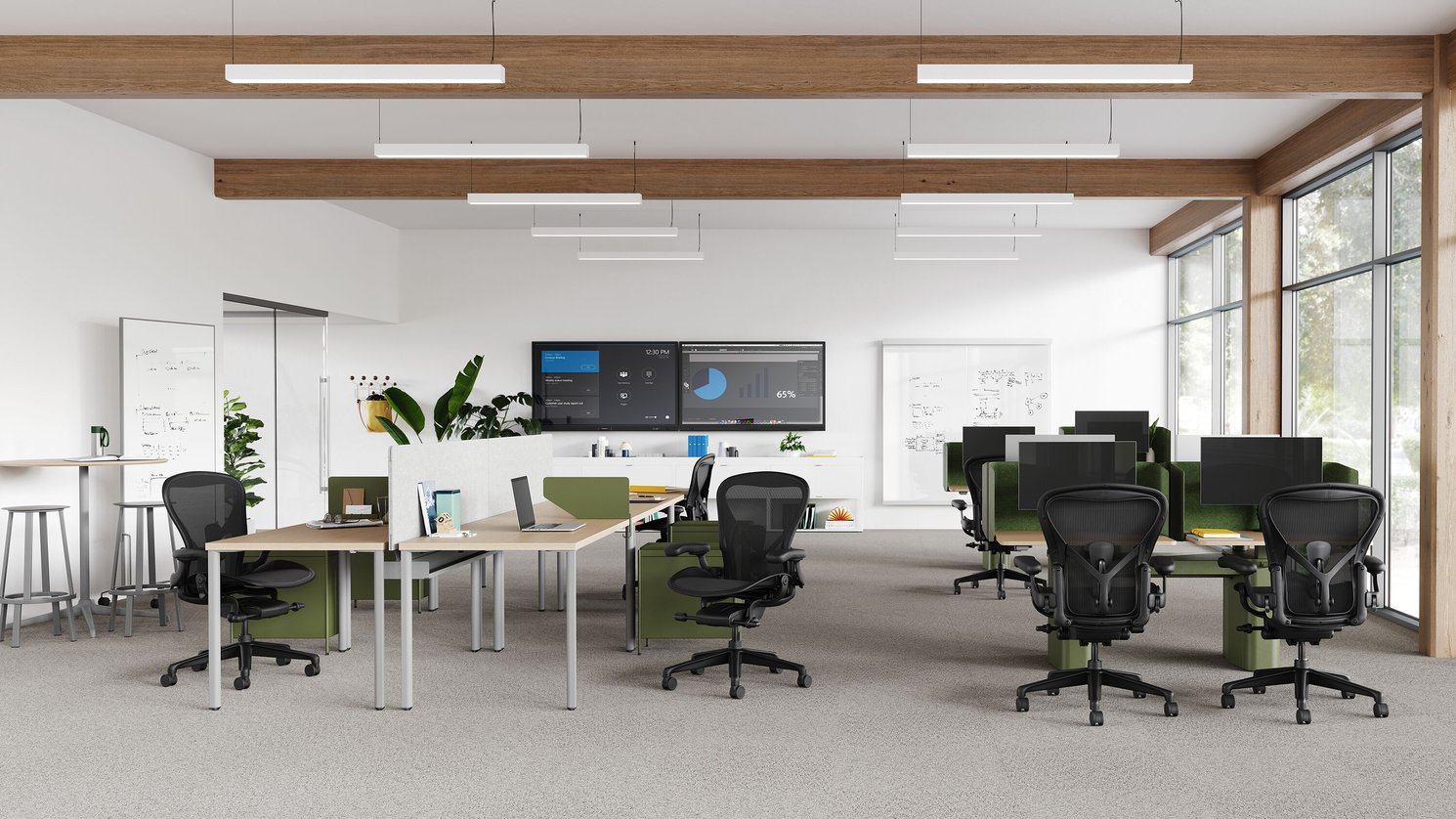
New York City offices face a unique set of pressures. Longer commutes mean employees often arrive already fatigued. Smaller floor plates mean denser seating arrangements. And the return-to-office movement has brought workers back to desks they may not have adjusted in years — or ever.
The business case for ergonomic investment is well established. Studies consistently show that proper ergonomic seating reduces musculoskeletal complaints by 35–50%, lowers absenteeism, and improves sustained focus during long working sessions. For a 50-person NYC office, the cost of one team member on extended leave due to a back injury will typically exceed the cost of refurnishing the entire floor with quality ergonomic chairs.
What Makes a Chair Truly Ergonomic? Key Features to Understand
The word 'ergonomic' is heavily marketed and often misapplied. A truly ergonomic chair is one that can be adjusted to support the unique proportions of the person using it. Here are the features that actually matter:
1. Lumbar Support
The lower back is the most common site of desk-related pain. A quality ergonomic chair provides adjustable lumbar support that follows the natural curve of the spine — not a fixed foam pad that may or may not align with your body. Look for chairs where lumbar height and depth are independently adjustable.
2. Seat Depth and Pan Adjustment
The seat pan should accommodate different leg lengths. The front edge of the seat should sit approximately two to three finger-widths behind the back of the knee. Seat depth adjustment is non-negotiable in any multi-user environment — it's one of the most commonly overlooked specs.
3. Armrest Adjustability (4D Armrests)
Basic armrests only move up and down. Four-dimensional (4D) armrests adjust in height, width, depth, and pivot angle. This allows the arm to rest in a natural position that reduces shoulder and neck strain, particularly for those who type for extended periods. Budget chairs rarely include true 4D arms.
4. Seat Height Range
A standard chair adjusts from approximately 16" to 21" in height. For a diverse workforce — or if your team includes people who are notably taller or shorter — verify the seat height range against your team's actual needs. Many NYC tech and finance offices now specify chairs with extended height ranges for taller employees.
5. Recline Tension and Lockout
A dynamic recline that allows movement throughout the day reduces spinal compression far more effectively than a static, upright position. The best chairs allow users to set tension (how hard they need to push to recline) and lock the chair at their preferred angle. Some premium models offer a forward tilt for tasks that require leaning into the work.
6. Breathable Mesh vs. Upholstery
Mesh backs promote airflow during long sitting periods, reducing heat buildup and discomfort. Upholstered chairs offer a softer, more traditional feel and are often preferred for executive environments. Many premium chairs now offer hybrid options — a mesh back with an upholstered seat — which balances both comfort goals.
The Top Ergonomic Office Chairs for NYC Offices
Below, we break down the leading ergonomic chairs we specify most frequently for New York City clients — with honest assessments of who each chair is best suited for.
1. Herman Miller Aeron — The Industry Standard
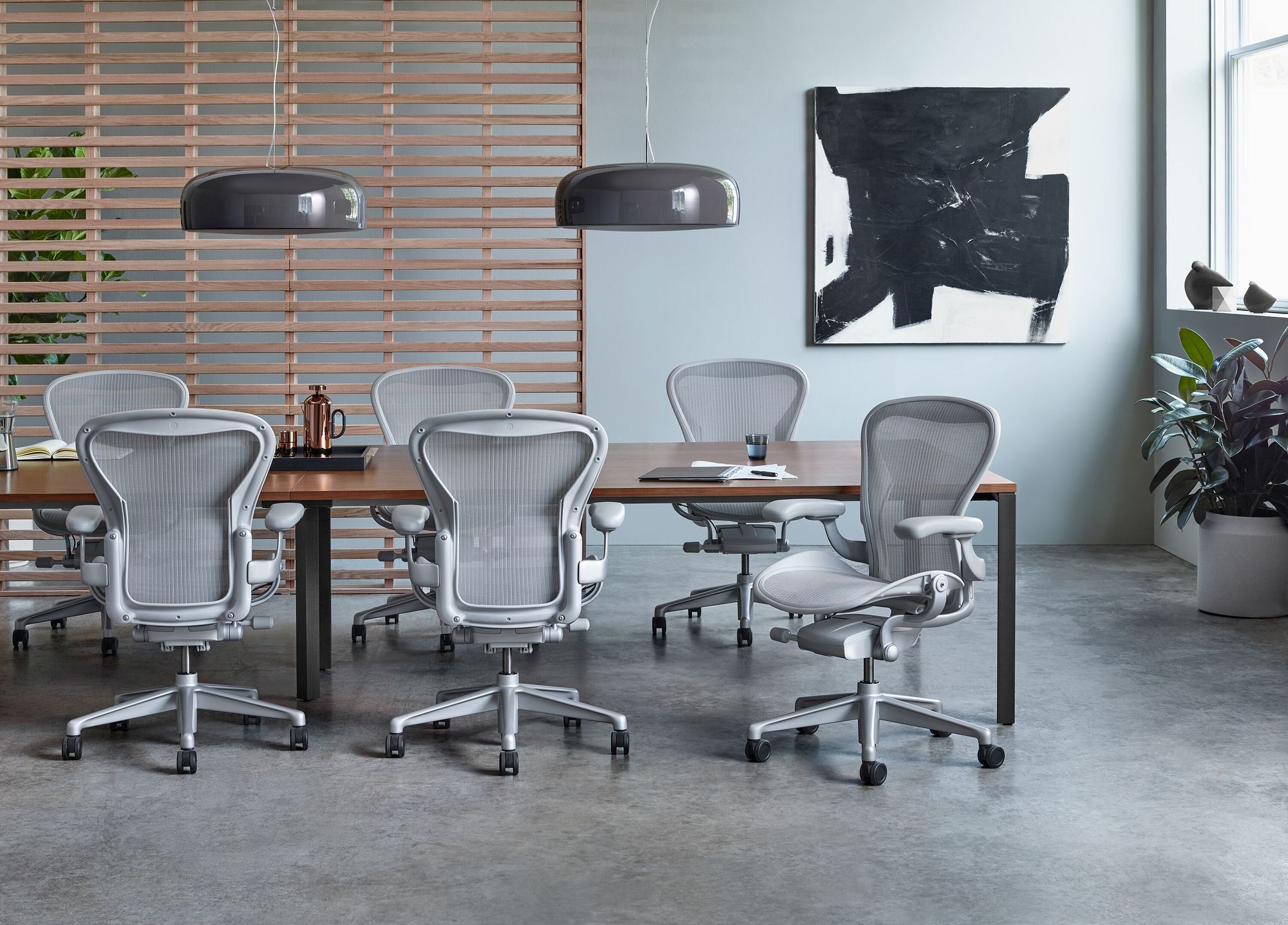
The Herman Miller Aeron has been the benchmark ergonomic office chair since its introduction in 1994, and the third-generation Aeron (updated in 2016) remains the default specification for serious ergonomic programs. It is the chair you will find in most law firms, financial institutions, and tech companies across Manhattan.
|
Advantages |
Disadvantages |
|
✓ PostureFit SL lumbar support targets both the sacrum and lumbar regions simultaneously |
✗ Premium price point — not the right choice for temporary or budget-constrained workstations |
|
✓ 8Z Pellicle mesh distributes weight evenly and promotes airflow |
✗ Some users find the mesh seat less comfortable than cushioned alternatives during very long sessions |
|
✓ Available in three sizes (A, B, C) to accommodate a wide range of body types |
✗ Sizing (A/B/C) requires proper specification to avoid poor fit |
|
✓ Tilt limiter and seat angle adjustment for dynamic, personalized positioning |
|
|
✓ Industry-leading 12-year warranty with Herman Miller's robust service network |
|
|
✓ Highly configurable — multiple arm types, base finishes, and tilt options |
|
|
Specification |
Detail |
|
Seat Height Range |
14.75" – 18.75" (Size A) | 16" – 20.5" (Size B) | 16.75" – 21.25" (Size C) |
|
Weight Capacity |
Up to 350 lbs |
|
Warranty |
12 years, 3 shifts |
|
Lead Time (NYC) |
2–4 weeks standard | 6–8 weeks fully custom |
|
Price Range (via Benhar) |
$1,395 – $1,895 depending on configuration |
|
Best For |
Law firms, finance, tech, any office requiring all-day ergonomic performance |
2. Herman Miller Embody — Best for Cognitive Work
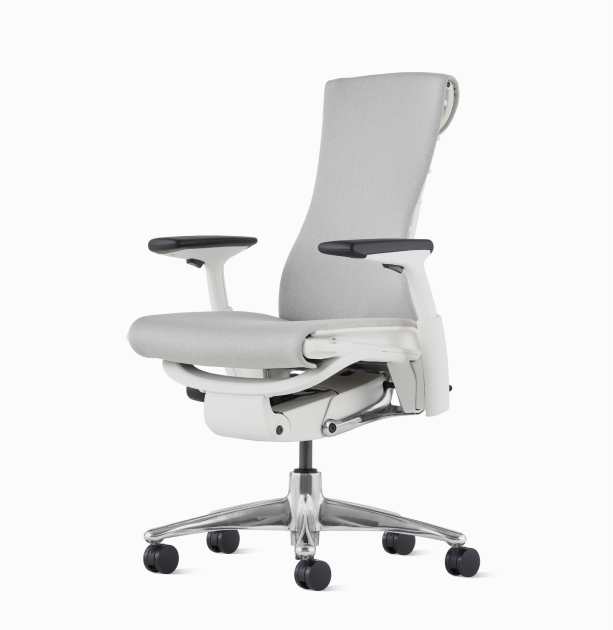
Designed in collaboration with over 30 physicians and PhDs, the Embody was built specifically for cognitive tasks requiring sustained mental focus — making it a natural fit for NYC's tech, media, and creative sectors. Its Pixelated Support backrest automatically adjusts to the user's spine, distributing weight across a broader surface area and reducing pressure on the circulatory system.
|
Advantages |
Disadvantages |
|
✓ Pixelated Support back adjusts dynamically to individual spinal movements |
✗ Higher price point than the Aeron — hard to justify for non-knowledge-worker roles |
|
✓ Designed to promote healthy blood and fluid flow during extended desk sessions |
✗ The wider, distinctive back silhouette may not suit all aesthetic preferences |
|
✓ Tilt limiter with four position lock and forward tilt option |
✗ Less suited to collaborative or standing/perching scenarios |
|
✓ Available in an extensive range of fabrics and finishes for design-sensitive environments |
|
|
✓ Proven to reduce muscle activity and nerve pressure in extended use studies |
|
|
Specification |
Detail |
|
Seat Height Range |
16" – 20.5" |
|
Weight Capacity |
Up to 300 lbs |
|
Warranty |
12 years, 3 shifts |
|
Lead Time (NYC) |
3–5 weeks standard |
|
Price Range (via Benhar) |
$1,895 – $2,395 depending on configuration |
|
Best For |
Tech companies, media, creative studios, any role requiring deep, sustained cognitive focus |
3. Humanscale Freedom — Best for Collaborative & Hybrid Environments
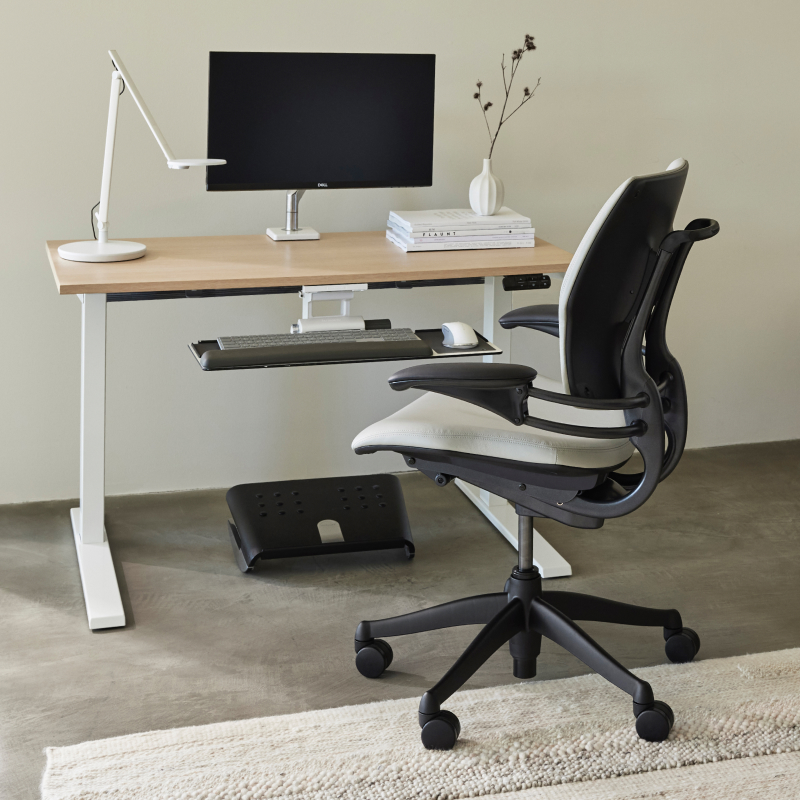
Designed by Niels Diffrient and made by New York-based Humanscale, the Freedom chair pioneered the concept of self-adjusting recline — automatically calibrating recline resistance to the user’s body weight without levers or manual setup. That intuitiveness makes it an ideal fit for collaborative and hybrid environments where multiple people share workstations throughout the day. The Freedom’s pivoting headrest and Form-Sensing Mesh back have made it a fixture in media, legal, and creative offices across Manhattan.
|
Advantages |
Disadvantages |
|
✓ Self-adjusting recline automatically calibrates to the user’s body weight — no manual tension setup needed, ideal for multi-user environments |
✗ Higher price point than some competitors for a chair without a traditional lumbar adjustment system |
|
✓ Pivoting headrest provides neck and upper back support during recline — a differentiator at this price point |
✗ Form-Sensing Mesh back, while highly responsive, may feel less structured than the Herman Miller Aeron for users who prefer firm lumbar contact |
|
✓ Armrests pivot with the user during recline, keeping arms supported in all positions — reduces shoulder strain in extended sessions |
|
|
✓ Designed and manufactured in New York City — a compelling story for NYC-based clients with a preference for local sourcing |
|
|
✓ Available in leather, mesh, and fabric upholstery options — suits both executive and open-plan environments |
|
|
Specification |
Detail |
|
Seat Height Range |
15.5" – 20.5" |
|
Weight Capacity |
Up to 300 lbs |
|
Warranty |
12 years |
|
Lead Time (NYC) |
3–5 weeks standard |
|
Price Range (via Benhar) |
$1,295 – $1,695 depending on configuration |
|
Best For |
Open plan offices, collaborative environments, hybrid workstations, media and creative studios, executive suites requiring headrest support |
4. Herman Miller Sayl — Best Value Without Compromising Ergonomics
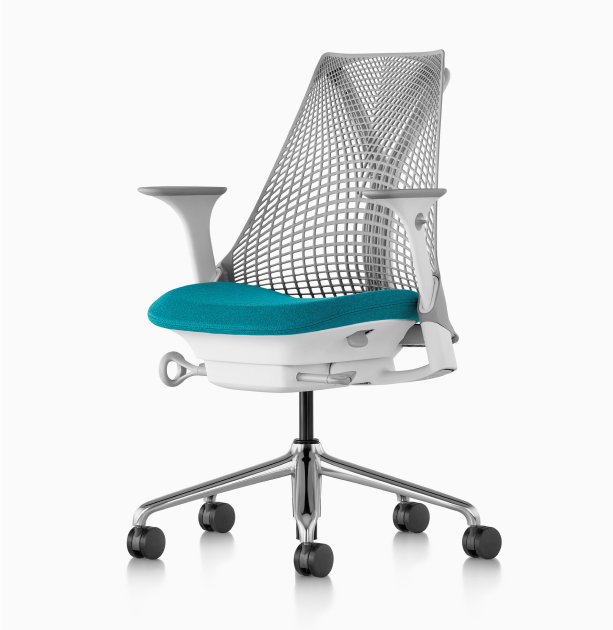
Designed by Yves Béhar, the Sayl brings genuine ergonomic performance to a more accessible price point. Its suspension back, inspired by the structure of suspension bridges, provides flexible support without the weight and bulk of mesh-backed competitors. For growing NYC companies furnishing a full floor, the Sayl delivers strong ergonomic value at a price that makes a quality-wide deployment realistic.
|
Advantages |
Disadvantages |
|
✓ Unframed suspension back provides flexible, lightweight lumbar support |
✗ Fewer adjustment points than the Aeron or Embody — less suited to a workforce with extreme anthropometric variation |
|
✓ Striking, distinctive design — one of the most visually recognizable chairs in the market |
✗ The open suspension back may not suit all preferences for lumbar feel |
|
✓ Strong ergonomic performance relative to its price point |
✗ Not the right choice for C-suite or executive environments where material premium matters |
|
✓ Fully height-adjustable arms in the fully-specified version |
|
|
✓ Available in a wide range of colors — popular for creative and tech office environments |
|
|
Specification |
Detail |
|
Seat Height Range |
15" – 20" |
|
Weight Capacity |
Up to 350 lbs |
|
Warranty |
12 years |
|
Lead Time (NYC) |
2–4 weeks standard |
|
Price Range (via Benhar) |
$595 – $895 depending on configuration |
|
Best For |
Startups, creative agencies, growing companies furnishing a full floor on a considered budget |
Side-by-Side Comparison: Top Ergonomic Chairs for NYC Offices
|
Chair |
Best For |
Price Range |
Warranty |
Key Differentiator |
|
Herman Miller Aeron |
All-day performance, law & finance |
$1,395 – $1,895 |
12 years |
3 sizes, PostureFit SL, industry standard |
|
Herman Miller Embody |
Cognitive / knowledge work, tech |
$1,895 – $2,395 |
12 years |
Pixelated support, circulatory focus |
|
Humanscale Freedom |
Collaborative & hybrid environments |
$1,295 – $1,695 |
12 years |
Self-adjusting recline, pivoting headrest, NYC-made |
|
Herman Miller Sayl |
Startups, creative, budget-conscious |
$595 – $895 |
12 years |
Best value-to-ergonomics ratio |
How to Choose the Right Ergonomic Chair for Your NYC Office
The best ergonomic chair for your office depends on four factors: your workforce's physical diversity, the nature of the work being done, your design environment, and your budget. Here is a practical framework for making the decision:
Step 1: Assess Your Workforce's Range of Body Types
If your team is physically diverse — a wide range of heights, weights, and proportions — prioritize chairs with the most adjustment range. The Herman Miller Aeron’s three-size system is specifically designed to address this. If your team is relatively uniform, a one-size chair like the Humanscale Freedom may serve you well without the additional complexity.
Step 2: Match the Chair to the Type of Work
Heads-down, solo concentration work (legal, finance, coding): Herman Miller Aeron or Embody.
Highly collaborative, move-around environments: Humanscale Freedom.
Mixed-use / agile workplaces with hot-desking: Herman Miller Sayl or Humanscale Freedom — both are easy to adjust quickly and suit varied users.
Executive offices requiring a premium aesthetic: Herman Miller Aeron (graphite or polished aluminum) or Embody with premium upholstery.
Step 3: Consider Your Lead Times
Standard configurations from our inventory can typically ship and be installed within two to four weeks. Heavily customized orders — specific fabrics, finishes, or non-standard configurations — can run six to eight weeks. For large-scale NYC office fitouts with a fixed move-in date, we recommend finalizing seating specifications at least eight weeks out from your target installation date.
Step 4: Budget Realistically
A common mistake is to budget for the best chair without accounting for the full scope of seating — task chairs, side chairs, lounge seating, and conference chairs. We recommend allocating the majority of the seating budget to primary task chairs (where people spend the most time) and being more value-conscious on secondary seating.
What Should You Budget for Ergonomic Office Chairs in NYC?
Pricing varies based on configuration, fabric, and order volume. As a certified MillerKnoll dealer, we work with clients across a wide range of budget levels. Here is a realistic guide to what you should expect to invest:
|
Budget Tier |
Chair Options |
Typical Use Case |
Per Chair (Approx.) |
|
Entry-Level Ergonomic |
Herman Miller Sayl,(base config) |
Growing teams, secondary workstations, hot-desking areas |
$595 – $895 |
|
Mid-Range |
Humanscale Freedom, Aeron (base config) |
Standard task chairs for most professional environments |
$1,195 – $1,495 |
|
Premium |
Aeron (full config), Embody (base config) |
Law firms, finance, executive environments |
$1,595 – $1,895 |
|
Executive / Bespoke |
Embody (full config), custom finishes, special orders |
C-suite offices, client-facing boardrooms |
$1,895 – $2,500+ |
Note: Volume pricing is available for orders of 20 or more chairs. Contact our team for project pricing.
The Cost of Getting It Wrong: Why Cheap Office Chairs Are Expensive
We regularly receive calls from NYC businesses looking to replace chairs purchased at big-box retailers or from discount online sources — often within 18 to 24 months of purchase. The pattern is familiar: the chairs seemed cost-effective initially, but they have since created a wave of employee complaints, replacement costs, and in some cases, HR issues related to workplace comfort.
A quality ergonomic chair from a leading manufacturer has a realistic lifespan of 12–15 years with proper care. A budget chair may last three to five years — and will rarely provide the ergonomic support that prevents the musculoskeletal issues that drive the real cost. When you calculate cost per year of use, the premium chair almost always wins.
|
The Real Cost Comparison Budget chair at $250: ~3 year lifespan → $83/year Herman Miller Aeron at $1,500: ~12 year lifespan → $125/year Add ergonomic benefits: Reduced absenteeism, fewer HR complaints, better retention → the $125/year chair pays for itself many times over. |
Ready to Find the Right Chair for Your Team?
At Benhar Office Interiors, we've been specifying and installing ergonomic seating across Manhattan's most demanding offices for over two decades. As a certified MillerKnoll dealer, we offer access to Herman Miller and Knoll's full product ranges, sample programmes, and volume pricing. Contact us today to arrange a seating consultation.